Maximizing Productivity with an Editable Canva Monthly Habit Tracker
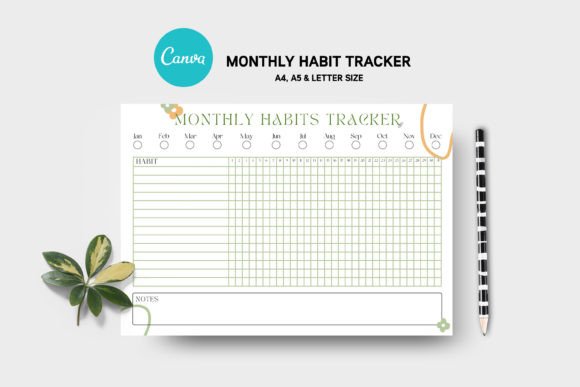
In the landscape of personal development and professional organization, consistency is often the dividing line between ambition and achievement. For professionals, entrepreneurs, and creatives alike, tracking daily behaviors provides the data necessary to refine routines and eliminate inefficiencies. While numerous digital apps and static PDFs exist for this purpose, the Editable Canva Monthly Habit Tracker represents a distinct shift toward flexible, user-centric planning. This resource is not merely a pre-designed image; it is a fully functional workspace within the Canva ecosystem, offering 100 editable planner sheets designed to adapt to the specific workflows of modern users.
The core value proposition of this tool lies in its adaptability. Unlike rigid printed planners or locked digital files that force the user to conform to a specific layout, this collection leverages the cloud-based power of Canva. It allows individuals to modify colors, swap fonts, rearrange elements, and integrate personal branding or imagery without requiring advanced graphic design skills or software like Photoshop. For those managing multiple projects or seeking to align their planning tools with their aesthetic preferences, this level of customization ensures the tracker remains a useful part of the daily routine rather than a discarded novelty.
Architecture and Customization Capabilities
The foundation of this resource is its comprehensive library of 100 unique planner sheets. This volume provides significant variety, ensuring that users do not succumb to "planner fatigue" caused by repetitive visuals. Each sheet is constructed as a native Canva project, meaning every element on the page—from the grid lines and checkboxes to the header text and background patterns—is an independent object that can be manipulated.
Users can easily alter the color palette to match their mood, seasonal themes, or corporate branding guidelines. For a marketer managing a content calendar, the tracker can be adjusted to reflect brand colors, creating a cohesive visual identity across all business documents. Similarly, an educator might choose softer, calming tones to reduce visual stress. The ability to change fonts is particularly valuable for readability and accessibility; users can switch to dyslexia-friendly typefaces or bold, impactful headers depending on their visual processing needs.
Furthermore, the inclusion of free font links in the main download file removes a common barrier to entry. Often, designers utilize premium typography that requires subscriptions or one-off purchases. By curating a selection of high-quality, free-to-use fonts and providing direct access links, this template set ensures that the final output looks professional without incurring additional costs. This attention to detail underscores the practical utility of the package, allowing users to focus on habit formation rather than troubleshooting typography licenses.
Format Versatility and Technical Accessibility
A critical aspect of any digital planning tool is its compatibility with various devices and printing methods. This Editable Canva Monthly Habit Tracker addresses diverse usage scenarios by supporting multiple file formats, including PDF, JPG, and the native Canva link. The availability of A4, A5, and Letter sizes ensures that whether a user prefers standard office paper, compact pocket planners, or US letter documentation, the templates fit perfectly without awkward cropping or white space issues.
The workflow is designed for seamless integration into both digital and analog systems. Users who prefer writing by hand can export the customized sheets as high-resolution PDFs and print them at home or at a professional print shop. The vector-based nature of Canva designs ensures that lines remain crisp and text stays sharp regardless of the scaling. Conversely, for those who operate entirely within a digital environment—such as tablet users utilizing styluses with note-taking apps—the JPG and PDF formats serve as excellent backgrounds for digital annotation.
Crucially, the requirement for no Photoshop installation lowers the technical barrier significantly. Many professionals possess strong domain expertise but lack time to master complex raster graphics editors. By utilizing the intuitive drag-and-drop interface of Canva, users can achieve sophisticated design modifications in minutes. This efficiency is vital for busy freelancers and small business owners who need to iterate quickly. The "reusable" nature of the templates means that once a master design is created, it can be duplicated and tweaked month after month, establishing a consistent yet evolving tracking system.
Practical Application Across Professions
The utility of this tracker extends beyond simple habit checking; it serves as a strategic tool for various professional demographics. For entrepreneurs and small business owners, the tracker can be customized to monitor key performance indicators (KPIs) alongside personal wellness habits. One might track daily sales calls, social media engagement metrics, and inventory checks on the same sheet used to log water intake and exercise, providing a holistic view of business-health balance.
Content creators and bloggers will find the 100-sheet variety particularly beneficial for maintaining creative momentum. The ability to add custom images allows these users to embed inspiration boards or project thumbnails directly onto the tracker. This visual reinforcement can stimulate creativity and keep long-term goals top-of-mind. Additionally, publishers and educators can utilize these templates to create structured lesson plans or editorial calendars, leveraging the grid systems to organize complex timelines visually.
For corporate professionals and marketers, the clean and elegant design language of these templates supports a professional image when shared in team settings. A marketing manager could customize a set of trackers for their team to monitor campaign milestones, ensuring everyone is aligned on weekly objectives. The flexibility to remove or add elements means the tracker can evolve from a broad monthly overview to a granular weekly sprint board as project needs dictate.
Evaluating Long-Term Value and Usability
When assessing the long-term value of the Editable Canva Monthly Habit Tracker, the factor of sustainability stands out. Many digital products offer a static solution that becomes obsolete as user needs change. In contrast, the editable nature of this resource future-proofs the investment. As a user's priorities shift—for instance, moving from a focus on fitness to a focus on financial savings—the tracker can be reconfigured to reflect these new goals without purchasing a new system.
The quality of the underlying design also contributes to its effectiveness. The templates are described as "elegant and clean," a deliberate choice that reduces cognitive load. Cluttered planners often discourage use because they feel overwhelming before the user even begins. By offering a minimalist starting point that can be expanded only as needed, the design encourages consistent engagement. The reliability of the Canva platform further ensures that files are accessible from any device with an internet connection, facilitating updates on the go.
However, users should approach this tool with a realistic understanding of its requirements. While no Photoshop is needed, a basic familiarity with the Canva interface is beneficial to maximize the customization features. Users completely new to the platform may require a brief learning curve to understand how to duplicate pages, group elements, and export files efficiently. Nevertheless, the intuitive nature of Canva generally mitigates this hurdle quickly.
Strategic Recommendations for Implementation
To derive the maximum benefit from this resource, users should adopt a strategic approach to setup. Rather than attempting to customize all 100 sheets immediately, it is advisable to select a core set of five to ten layouts that best suit current objectives. Spend time refining these masters—setting the perfect font hierarchy, color scheme, and element placement. Once these "master templates" are established, they can be duplicated for future months, saving significant time while maintaining consistency.
It is also recommended to utilize the image upload feature to personalize the experience. Adding a photo of a goal destination, a family member, or a project milestone to the header of the tracker can serve as a powerful psychological anchor, reinforcing the "why" behind the habits being tracked. For teams, establishing a shared brand kit within Canva before distributing these trackers ensures that all members maintain a unified look, enhancing professional cohesion.
In conclusion, the Editable Canva Monthly Habit Tracker offers a robust, flexible solution for anyone seeking to impose structure on their daily lives without sacrificing aesthetic control. Its strength lies not just in the number of templates provided, but in the freedom it grants the user to shape the tool to their specific context. Whether utilized by a solo freelancer organizing their gig economy workflow or a corporate team aligning on quarterly goals, this resource bridges the gap between rigid planning systems and chaotic improvisation. By combining high customizability with ease of use, it stands as a practical asset for sustained productivity and personal growth.